

As a professional writer, the experience of writing matters to me a great deal. Especially when I’m writing for pleasure. With the EPOMAKER Glyph, I have a device that I truly, deeply love writing on.
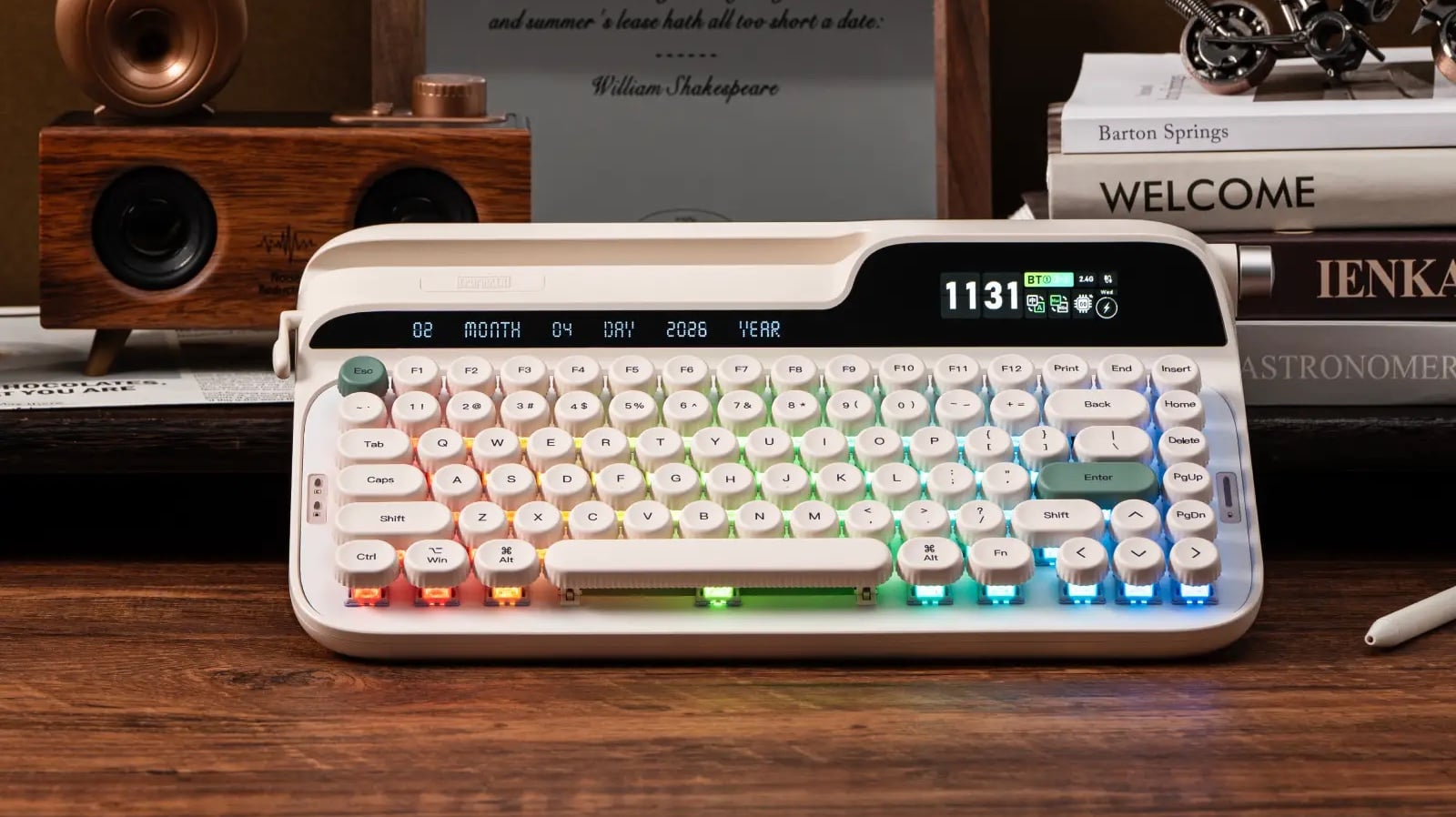
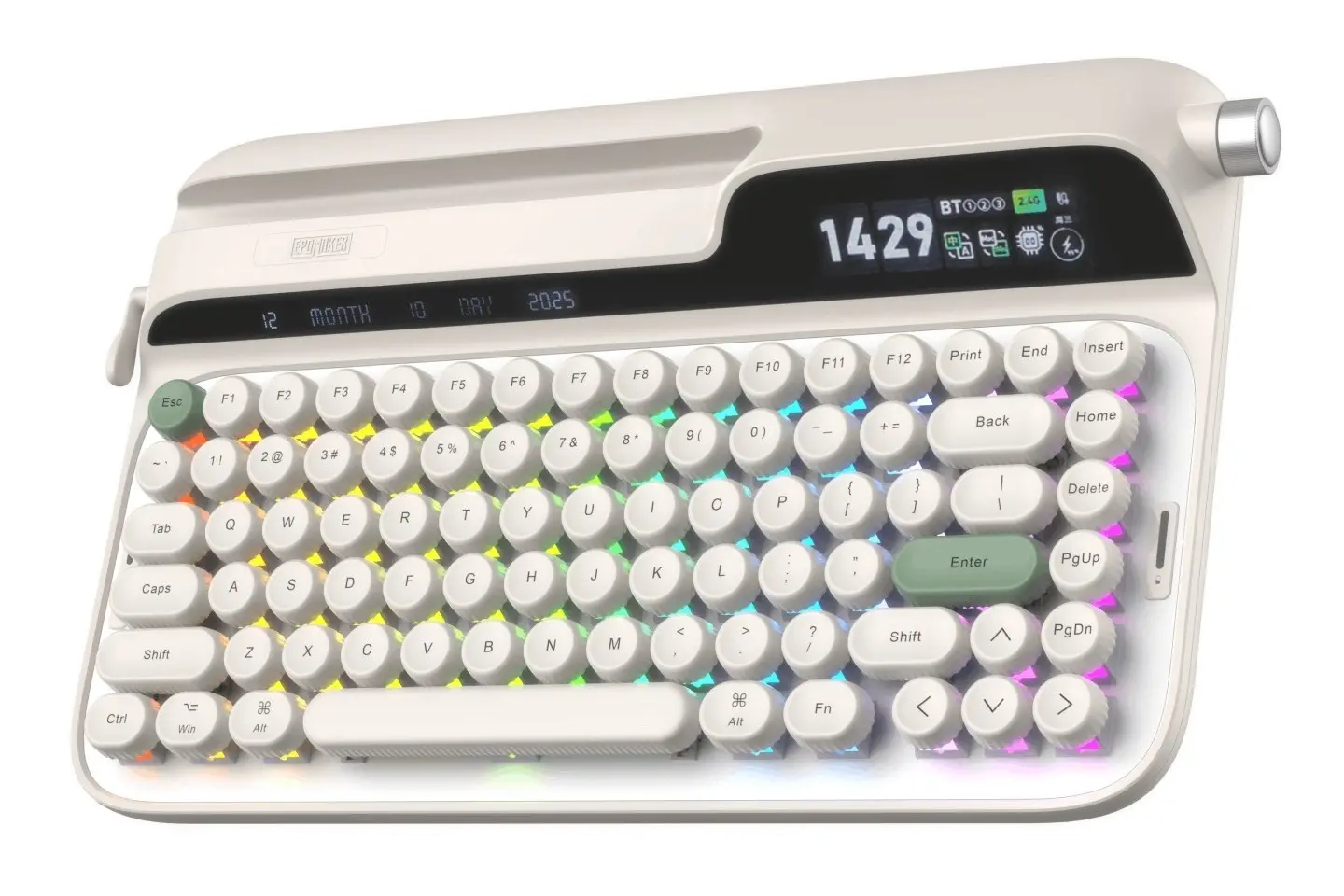
The aesthetic appeal of the thing should be obvious without me needing to explain it: It looks like a typewriter. What is less readily apparent from the screenshots is what it feels like to actually use. For a start, it’s heavy. Enormously heavy. Heavier than my laptop. And I mean all those things as a compliment. There is a weight and bulk to this device that gives it a weird kind of gravitas, solidity and stability. It doesn’t risk sliding or falling off my lap when I sit in a comfortable chair with my glass of wine on a Sunday evening (I’m writing a novel, but no, I don’t expect to ever publish it; it’s just for me). It’s equally at home on my work desk with a nice, gentle slope that helps my fingers glide across it.
All of this is important because my preferred device to connect to it is not my laptop. The Glyph supports both Bluetooth and 2.4GHz wireless, but the real intent of the device is Bluetooth, and we know that because the little indent on the top left-hand side of the keyboard is ideal to sit a tablet in. It even has a little ridge on the inside of the indent to help keep that tablet in place securely. Because the indent only takes half the keyboard, it’s very likely that your tablet will stick out the side, but it still makes for a comfortably compact way to type.

Underneath the ridge is a long, thin LCD screen which displays the date. It’s there more for the aesthetics (who actually needs yet another way to quickly check the date than the tablet they’re likely using with the Glyph, or the phone they have likely next to it while they type?). The right-hand side has a larger screen built into the device. When you first turn the device on, this displays the time and remaining battery life of the keyboard. However, for fun you can drop into the EPOMAKER software and replace that with a little wallpaper. I did that and put one of my Dee Dee arts on the device only to discover that there was no way to change it back to the time and battery icon. Some might care, but the battery icon was the only really useful piece of information there, and Dee Dee is a pretty addition to the keyboard experience.
All of this would be for nothing if the keys felt bad to type with. Thankfully they’re my favourite part. First things first – there is a nice texture that has been added to the top of the distinctive, rounded keys, which gives them a tactile feel that can only be described as “what matte would feel like to touch.” I have no idea if this will wear off over time, but I certainly hope not. EPOMAKER’s product description says that the keycaps have a PBT Plastic cap on them, which is a durable material that does resist wearing, so I’m confident that these keys will retain that quality for at least the medium term under my demanding use habits.
The keys themselves are very sensitive, and at first it felt like the slightest pressure would register, leading to more mistakes and typos than I am used to. That didn’t last long, though. After a short period of adjustment, I found that the luxurious spacing of the keys, when combined with that sensitivity, allowed my fingers to fly across the keyboard, with a rhythmic, soft “clicking” that is far less jarring on the ears than traditional mechanical keyboards. The result is both ergonomic (because I’m not putting so much pressure on my fingers to press down with every keystroke) and pleasing to use over long periods of time on the ears.
The grand sum of all of this is that the Glyph is a rarity among keyboards I review for DDNet in that it’s not really a gaming-first device. It can certainly be used in games, and that 2.4GHz option sells its credentials there. The speed of typing will also help people in action games. Nonetheless, everything about this keyboard tells you it’s more for the budding Tolkien than… I don’t actually know any of the superstars in the eSports scene. Given the tendency to use silly handles, I’ll go with MightyFoShizzle. The Glyph is more for the budding Tolkien than someone aspiring to be the next MightyFoShizzle. It’s a typist’s delight, and everything about it supports the idea that this is a keyboard that you’ll want to look at and feel on your fingers as you write.
There’s even a little dial on the left-hand side, which is a dial that real typewriters have. On this device, all it does is substitute the Enter (slide the dial up) and Backspace (slide the dial down), and is completely impractical compared to the Enter and Backspace buttons. Yet I found myself using it when working through and reviewing passages and pages that I wrote, simply because it was a more tactile and enjoyable thing to play with.
For years now I’ve been considering buying myself a Freewrite typewriter, purely for the purposes of writing for fun and, if I do decide I want to write a book to publish, for that purpose. But a Freewrite is also a luxury-level purchase, and I’m not made of money. The EPOMAKER Glyph, when paired with a tablet, provides an almost equivalent experience that allows me it sit down, focus, and simply enjoy writing. You don’t have to be a professional writer to find value in this device, but I would suggest that, in contrast to many gaming keyboards out there, this device is ideal for people who do a lot of writing and want a keyboard that’s good for more than Fortnite leaderboard action.