Tradespeople have their power tools, and become very attached to the equipment that supports their livelihood. Athletes have their preferred racquet, shoe and clothing brand, for the comfort and competitive advantage the right gear can provide. As a writer, I am always on the lookout for a keyboard that is comfortable to type on. And because I play a lot of games, a keyboard that’s good for that is an added bonus. The Corsair Vanguard Air 99 Wireless is my new best friend.
The Air 99 Wireless is a premium-priced keyboard with a solid build quality, low-profile optical switches, an LCD screen in the corner and Elgato Stream Deck integration sitting right there on the keyboard. In combination, it makes for a device that will suit almost any use case you can think of.
For people who do a lot of typing, the Air 99 Wireless’s low profile makes for a very comfortable typing experience. It’s like working on a laptop’s keyboard, just with a more silken feel to the key presses. The keyboard is just shy of a full-sized keyboard, which means some of the keys that take up a lot of space on a normal keyboard are a little squished, and Corsair also opted to have less space between each key than is normal. At first, that led to some inaccuracies in my typing (well, more than normal), but I found myself adjusting quickly enough.
Once I had adjusted, I found my typing speed improved by the 1.5mm actuation distance on this keyboard (with 2.5mm total travel). It is comfortable to use over long periods of time thanks to an actuation force of just 45g, and aesthetically supported with a nice, soft sound that I find superior to mechanical keyboards, particularly over long periods of time and when I’m working quickly. There’s only so much “clacking” a person can take before they yearn for the sound of silence, and while many swear by mechanical keys for the feel, and accuracy, (and often that clacking sound), I think I’ll always prefer a premium optical experience, when it’s on a premium keyboard designed around the feel of the keys.
The other advantage of optical keyboards is that they tend to last longer, which is good, because I’ll want to be using this keyboard for a very long time.

Corsair has built gaming features into this keyboard that I’ll never benefit from, such as FlashTap, which is a feature that helps improve accuracy when the keyboard registers two competing inputs at the same time. A player in a fast-paced FPS, for example, may be hitting keys so close to one another that they’re telling their avatar to go in two different directions at the same time. FlashTap allows the player to set up how the keyboard responds to such inputs, allowing for trigger fingers to tailor their keyboard to compensate for their enthusiasm.
I, meanwhile, have spent most of my gaming time testing this keyboard, playing various classic Warhammer games and Wingspan. The keyboard has been great at blasting out some quick trash-talk at my gaming buddies over a heated game of bird cards, and I did score an all-time high of 185 while playing with the keyboard. Now, is the keyboard directly responsible for that? Perhaps not. But I do like to boast about how good I am at Wingspan.
The typing is only part of the experience with the Air 99 Wireless. Another very obvious feature is the little LCD screen in the top right corner of the keyboard. Unfortunately, while I am generally a fan of little screens in all my electronics, I would have liked this one to do a bit more than it does. It’s really just a status display, and of the statuses (statii?) that it displays, it’s only really the battery status that I would check. And I’d only do that because the keyboard’s battery life isn’t as good as I would like, and I found the display useful in reminding me to charge it before the next typing session. There is, without a doubt, future use cases of these tiny screens on keyboards that will be indispensable to the experience, but so far the only time I’ve come across a keyboard with a screen that I’ve paid attention to is one that had a little Snake clone on it, and I got embarrassingly hooked on that little Snek game.
However, the Air 99 Wireless does have a feature that is going to go over just great with users, and that’s the column of programmable keys on the far left of the keyboard. Content creators, streamers, and anyone else who sits within the Elgato target audience can assign up to six of their most used streaming functions and have them conveniently located on the keyboard. In addition, there’s a Stream Deck launch button on the keyboard that pulls up a virtual keyboard on the screen with all the rest of your Stream Deck features.
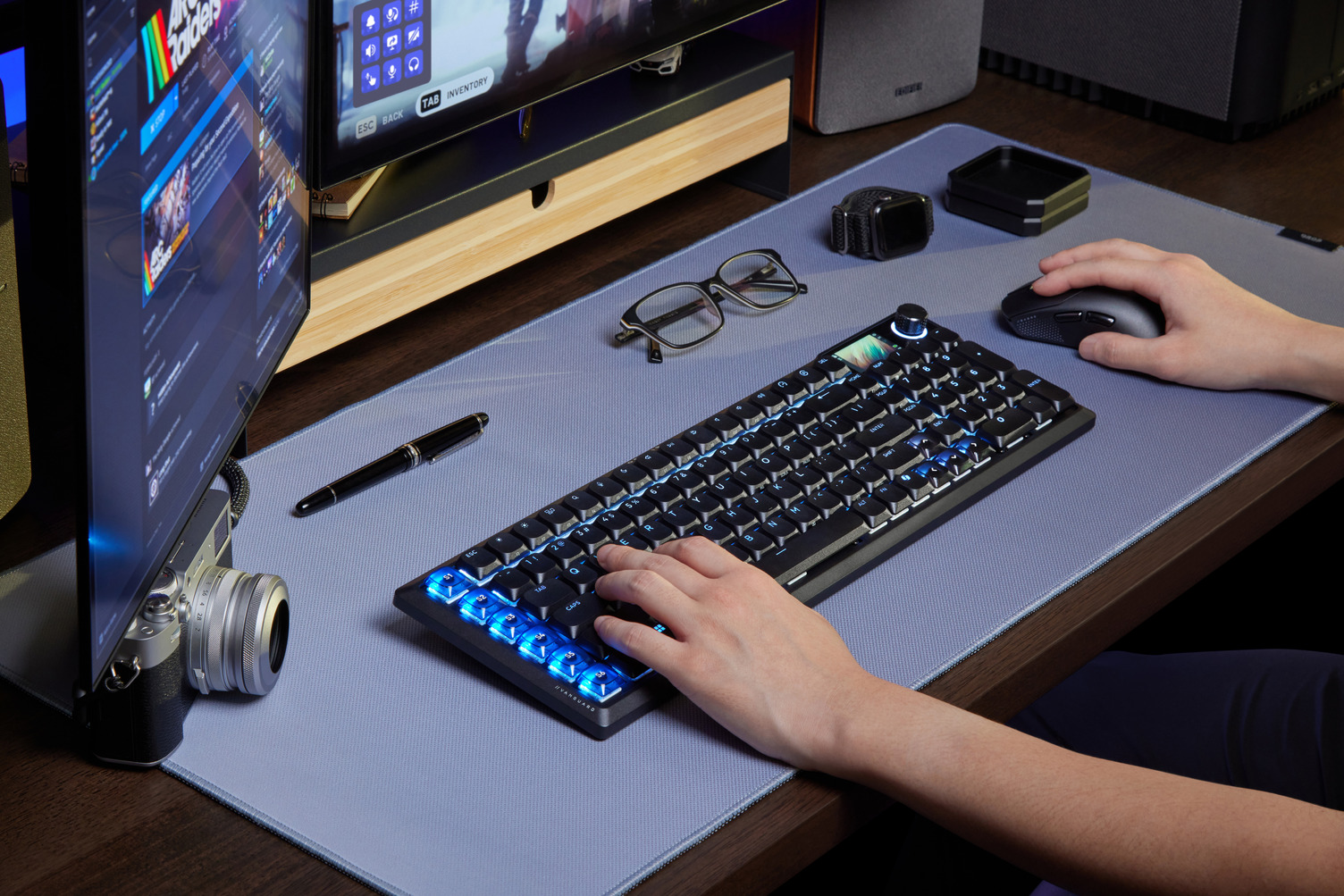
Obviously, if you’re not a streamer, these keys are going to go unused, but it is an enormously useful convenience for the target market, and helps to declutter what, for your typical streamer, is a cluttered desk. Of more use for a wider audience is the “Game Mode” key, which allows you to shut off certain functions (such as the Windows and Copilot keys) when you are playing a game and don’t want to accidentally pull those things up.
Or if you’re like me, you can turn that Game Mode on at all times because you never want to accidentally hit the Copilot key.
The sum of the Air 99 Wireless keyboard is that it’s close enough to ideal for just about every person who needs to use a keyboard. Typists will find the keys comfortable, responsive, durable and quiet. Gamers will find the polling rate and accuracy features to be sublime, and even eSports pros will find this keyboard a useful piece of kit. Streamers will love that Elgato integration. And nerds for tiny little screens that don’t do anything but look cool will enjoy the swirling Corsair logo on that little LCD in the corner. See? Everyone’s covered.
Jokes aside, this keyboard really is the real deal, and is worth every cent of its premium asking price.