
SteelSeries’ Rival Pro Mini is the company’s newest entry in the premium-priced gaming equipment category. I assume that there is substantial demand for mice that cost several hundred dollars, because there are plenty of companies to serve that market. To that audience, I am quite sure the Rival Pro Mini will go down a treat, but if $AUD 300 for a mouse seems excessive to you, then the innovations in this one aren’t going to convert you.
I mean, it is, ultimately, a mouse. A couple of buttons and a wheel. If you’re just working on Excel spreadsheets and your idea of a gaming session is a glass of wine and a marathon campaign of Civilization VI (no, not Civ VII, no one is playing that game and Firaxis’ patches have fixed nothing), then the Rival Pro Mini’s features are going to be lost on you. In fact, you might even find the mouse annoying because it has no wired connection to your PC. The only way to connect it to a device is by connecting a dock/wireless receiver. That dock also acts as a battery charging station, because the mouse comes with two batteries. You charge one while using the other, and then swap them over when the battery dies.
All good in theory, but the battery life on this mouse sucks, and every few days I find myself distracted by having to go through the process of swapping the batteries around and reconnecting. Now you could say “c’mon, that’s all of a minute’s disruption,” and, sure, that’s all it is. And in fairness, if I spent the time to jump into the settings every time I was reverting to “work mode” to drop down the specs so they were consuming less power, the battery would last significantly longer. On the other hand, that would be even more busywork, and I’m a set-and-forget guy, so I’ve left the mouse on the gaming settings. Wired mice never need me to drop in and out of the settings every time I do something different with them. Point is, I would argue that the Rival Pro Mini is not, in fact, a good all-day or work/play mouse. It’s designed as a gaming mouse and should be set up and then left (and used) for this application.

Of course I’m sure SteelSeries themselves would be the first to agree with me there, and then they’d roll their eyes at you for spending time on your computer doing work. As a pure gaming device, the Rival Pro Mini is exquisite. First of all, it feels lovely in the hand. The texturing on the mouse itself is cool, and the moulded plastic will fit most hands comfortably. Mini mice sometimes don’t work so well for people with larger hands, but SteelSeries has licked this challenge by making sure that regardless of the size of your hand, the upper part of the hand rests ergonomically on the top and the fingers can curl comfortably over the buttons.
It’s also an incredibly light mouse at less than 50 grams, so there’s no build-up of effort in moving the device around. The battery is going to tire out more quickly than your hand will.
Of course, the real point of any proper gaming mouse (and I’m sorry that it’s taken this long to get to it, but then again, us writers gotta do what it takes to keep the time-on-page metrics up), is the performance, and this is, of course, why SteelSeries has insisted that the only way to use the device is through its own wireless connection: The hardware all-but guarantees 8K polling and SteelSeries has the device running the entire 6.4GHz-9.056HGz spectrum, which is a lot of redundancy that greatly reduces the risk of interference, even when you’re in a room so aromatic with the smell of sweat that you could only be at an eSports event. It’s better technology than what a standard 2.4GHz wireless device would deliver, in other words. There’s an edge there for anyone serious enough about gaming that they would think to check the specs before purchasing a mouse.
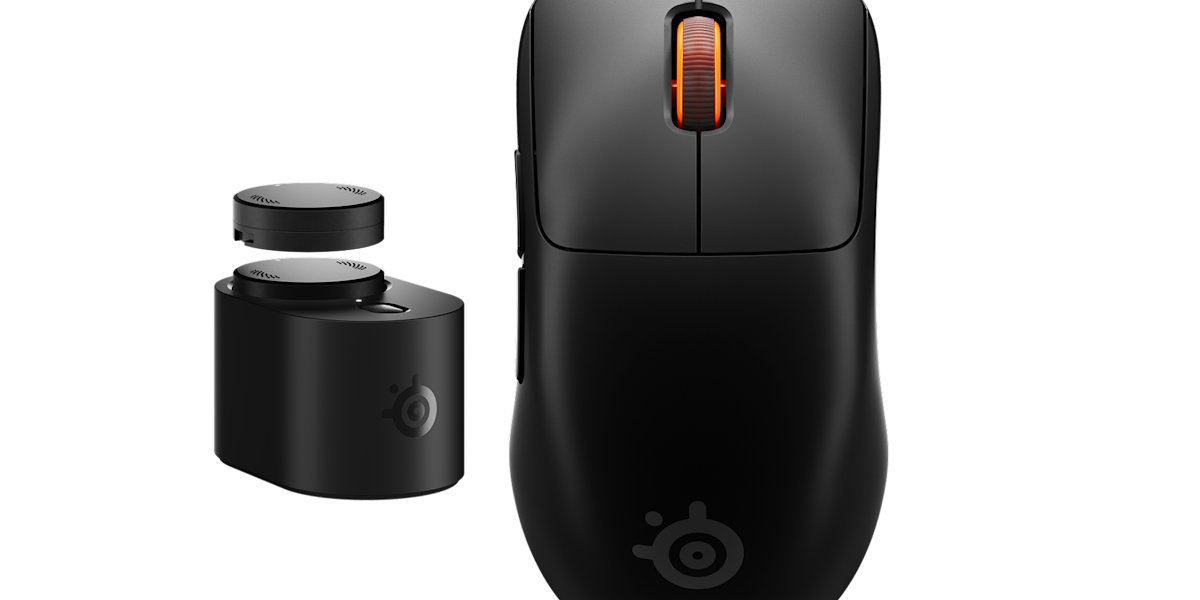
Going further into the details, the Rival Pro Mini has native 42,000 DPI and an 800 IPS tracking speed, up to 20,000 frames per second in maximum performance mode, and 70G acceleration. Meanwhile, tilt tracking allows the mouse to be picked up and moved or even rolled over less usual surfaces without it dropping a beat. For a laugh, I tried Age of Empires 2 – admittedly not an eSports FPS or League of Legends, but also an RTS that requires some quick mouse positioning and accuracy – with my leg acting as the mouse mat and… it worked.
I’m not sure when people might be in a situation where they need to use their leg as a mouse mat, but, I dunno. Perhaps you’re out camping and have your laptop hooked up to the power generator. You can play a lot of games without needing a flat surface when you’ve got the Rival Pro Mini in your corner.
When it comes to management and the settings, I would say that SteelSeries leads the pack, and the company’s eye for quality software applies to the Rival Pro Mini, too. As I said, I’m personally a set-and-forget kind of user, so I haven’t opened the software since first setting the mouse up, but the depth of features and control that is available through the GG app or Web platform is not to be sneezed at.
Really, the only issue with the SteelSeries Rival Pro Mini, if you’re going to use it for what it was intended to be used for (gaming), then the only issue to consider is the price. If you’re happy to drop $300 on a mouse, then what’s important to know is that on both feature set and execution, you couldn’t hope for a better way to spend your money. And if you’re the kind of person that would consider a $20 mouse sufficient, then you’re almost certainly not reading this review anyway. This score’s for you, hardcore gamer-types.